


Gyra AI - AI Art Generator
4.264.00 Reviews
App Specs
- Version
- 1.2.2
- Updated On
- License
- Free
- Downloads
- 5,000,000+
- Developer
- Hypernova Limited
- Categories
- Photography
- Platform
- Android
Screenshots



 Analysis by AppCompare
I’d start with a small, ordinary idea rather than expecting a finished masterpiece on the first try. Maybe I want a dreamy portrait for a profile picture, a strange landscape to share with a friend, or a visual spark for a project. That is where Gyra AI - AI Art Generator makes sense to me: it turns a photo or a rough concept into something more stylized without asking me to learn a full editing suite. It is a photography app from Hypernova Limited, and its appeal is less about precise retouching than about exploring what an image might become.
Choosing the right starting point
Before opening an AI art app, I find it helps to decide whether I want to transform an existing picture or begin with an idea. A clear photo gives the generator something concrete to reinterpret; starting from scratch leaves more room for surprise, but also more room for the result to drift away from what I imagined. Gyra offers both routes, so I can match the input to the job instead of forcing every creative task through one method.
For a casual social post, I would use a photo with one obvious subject and a simple background. That gives the visual transformation a useful anchor. If I am only experimenting, a sketch or a broad concept is more forgiving. Either way, I would keep the original image separately: generated art is a variation, not a replacement for the source I may want to edit or share elsewhere.
This distinction matters if you are deciding whether the app is right for you. Someone who wants playful reinterpretations, unusual looks, or a quick creative starting point is likely to get more from it than someone who needs exact, repeatable edits. I would not choose an AI generator as my main tool for accurate product photography, careful skin retouching, or a client brief that demands a specific composition down to small details.
Unveiling the Magic of AI Art
So, what is Gyra AI - AI Art Generator all about? In simple terms, it's an app that leverages the power of artificial intelligence to create stunning artwork. You don’t need to be a professional artist to use this app. Heck, you don’t even need to know how to draw a stick figure. The AI does all the heavy lifting for you, transforming your ideas into visual masterpieces.
Upon installation, the app greets you with an intuitive interface. It’s sleek, modern, and doesn’t overwhelm you with too many options. I appreciated how straightforward it was because, let’s be honest, who has time to figure out complicated menus?
Getting Started with Your Artistic Journey
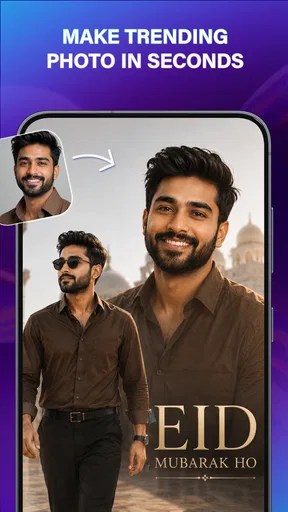
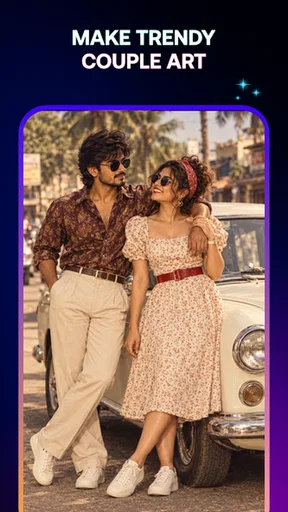
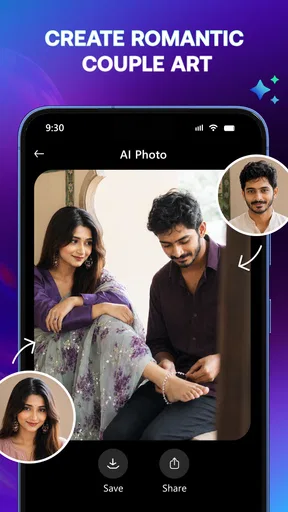
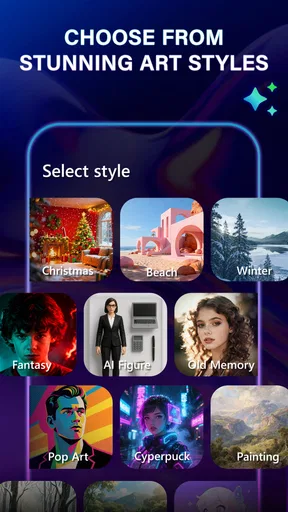
Diving into the app, you’ll find it offers several styles and templates to choose from. Whether you're into abstract art, surreal landscapes, or intricate portraits, Gyra AI has got you covered. The app allows you to either start from scratch or use one of your photos as a base. I experimented with both, and I must say, the results were nothing short of mesmerizing.
Worth Reading Before You Choose

EA SPORTS FC Mobile 26 Is a Bigger Football Game, but It Takes Time

Flipboard Shows What News Apps Must Do Beyond the Feed

Switching to Android Auto Means Rethinking Your Driving Routine

Google Calendar Makes a Crowded Week Easier to Manage

Ludo King Makes the Most of the Minutes Between Plans

Baby Panda World Brings Quick Play to Modern Phones, but Its Game Library Feels Busy
The process is as simple as selecting a style, uploading a photo or sketch, and letting the AI work its magic. Within seconds, you have a piece of art that looks like it came straight out of a gallery. The app’s ability to blend colors and textures is truly impressive.
Making a result you can actually use
When I make an image for a real purpose, I think about where it will go before I choose a look. A dramatic portrait can work well as a playful avatar, while a busy, highly textured result may become hard to read once cropped into a small social profile circle. I would make a few versions with different styles, compare them at the size they will actually appear, and only then decide which one to keep. That simple check helps avoid choosing an image that looks impressive full-screen but loses its subject in a tiny preview.
A practical workflow is to begin with a photo that already has the framing I want, then try a style that supports rather than competes with the subject. If the first result changes the mood but keeps the main idea, I can use it as a finished casual image. If it wanders, I can change the input or style instead of repeatedly asking for the same outcome. The useful trade-off is that a little experimentation can produce a distinctive result, but the app is not a precision editor where every detail stays under my control.
Features That Make It Stand Out
One of the standout features is the customization options. The app doesn’t just churn out generic art; it lets you tweak the outcome to better suit your vision. Adjust the color palette, play with textures, or even mix different styles to create something uniquely yours. This level of personalization means every artwork is a reflection of your creativity.
Another cool feature is the community gallery, where users can share their creations and draw inspiration from others. It’s a vibrant space that fosters creativity and provides endless ideas for your next project.
Inspiration, sharing, and the handoff
I see the community gallery as most useful before I start, not just after I finish. Browsing other creations can help me describe the kind of mood I want, even if I do not want to reproduce someone else’s image. I would treat examples as visual prompts: notice whether I am drawn to bold colors, softer textures, or an unusual portrait treatment, then make my own choice of source image and style. That turns browsing into a small planning step rather than an endless scroll.
Once I have a result, the next step is deciding what to do with it. For a personal post or message, an expressive image may be all I need. For a more involved project, I would take the generated art into a dedicated photo editor or design app to handle crops, text, layout, and final sizing. That handoff is important: Gyra is the creative transformation stage in my workflow, while a conventional editor is better for exact finishing and placement.
I would also pause before using a personal photo as input, especially if it includes other people. A picture that feels harmless in a private camera roll can feel different once it has been transformed and shared. I would choose images I am comfortable using for an AI-art experiment and check the final result before posting it. That is not a reason to avoid the app; it is just sensible care when a personal photograph becomes part of a new piece of artwork.
The User Experience: Smooth Sailing or Rocky Ride?
Using Gyra AI feels like a breeze. The app runs smoothly without any noticeable lag, even when generating complex images. This seamless experience is crucial, especially when you’re in the creative zone and don’t want anything to interrupt your flow.
The app is also consistently updated with new styles and features, which keeps things fresh and exciting. It’s clear the developers are committed to enhancing the user experience, and it shows.
Where it fits beside other photography tools
Compared with a standard photo editor, Gyra is aimed at changing the character of an image rather than giving me detailed control over every adjustment. A regular editor is the better choice when I need precise exposure, color correction, straightening, or a careful crop. A general-purpose image generator may suit someone who wants to build a scene without relying on a photo, while Gyra’s photo-based route is handy when I already have a subject and want to reinterpret it. I would use them as different tools, not assume one can replace the other.
That difference also sets expectations for consistency. If I need several images that must match closely for a business, campaign, or presentation, an unpredictable artistic transformation can create extra selection and cleanup work. For a one-off visual, a personal experiment, or a concept image, that variability can be the enjoyable part. The best choice depends on whether the brief rewards surprise or demands control.
Cost, access, and who should try it
The app is free to install, with in-app purchases priced from $4.99 to $29.99 per item. I would explore the basic experience first and only consider paying if I have a clear reason to keep using it; a striking first result alone does not prove that paid options fit my needs. Gyra has a 4.2 average from around 30,000 ratings and more than 5 million installs, which suggests it has reached a sizeable audience, though those figures cannot tell me whether its particular style will suit my taste.
It is rated for Everyone, runs on Android version 9 or later, and the current version is 1.2.2. The app was released on November 20, 2025. I would check that my device meets the system requirement before installing, then judge it on the kinds of images I actually want to make rather than on the promise of AI art in general.
For an everyday example, imagine I have a portrait I like but want something more imaginative for a casual birthday message. I could choose that photo, try a style that changes its mood, adjust the available options, and compare the result with the original before sending it. If the face or overall composition no longer feels right, I would try a different style or use another photo rather than treating the first output as final. That keeps the process light and makes the app useful without turning a quick greeting into a long editing session.
Where It Could Improve
While Gyra AI is fantastic, it’s not without its quirks. Sometimes, the AI-generated results can be a bit unpredictable. It’s part of the fun, but if you’re looking for something specific, it might take a few tries to nail exactly what you want.
I also noticed that some of the more detailed styles can take a bit longer to render. It’s not a dealbreaker, but it’s something to keep in mind if you’re in a hurry.
When I would choose another tool
If I am working against a deadline and need a reliable, exact image on the first pass, I would reach for a conventional editor or a design tool instead. The same goes for a photograph that must preserve small details faithfully: artistic processing can alter the very features I need to retain. For a polished deliverable, I would make the art here only if its unpredictability is acceptable, then finish it elsewhere and review it at its intended size.
There is also a difference between trying styles for fun and building a repeatable workflow. The first is a natural fit for Gyra; the second can be frustrating if each attempt shifts the image in a way I did not plan. My tip is to save time by starting with a source photo that already has the right subject and framing, and to change one choice at a time when a result misses the mark. That makes it easier to tell whether the issue came from the image or the selected look.
As a photography app, it sits in a category where many people expect familiar tools such as filters, cropping, and exposure controls. Gyra’s more unusual value is the leap from a real photo or sketch toward an artwork. If that is not what I want, a conventional camera or editing app is likely to be more useful day to day. If I want an easy way to explore visual treatments without drawing, this app offers a more playful starting point.
Final Thoughts: Is It Worth Your Time?
In a nutshell, Gyra AI - AI Art Generator is a delightful app for anyone looking to explore their creative side without the need for formal art skills. Its ease of use, coupled with the impressive AI capabilities, makes it a must-try for art enthusiasts and curious minds alike.
Whether you’re creating art for fun, for social media, or even for professional projects, this app offers a unique blend of creativity and technology that’s hard to beat. So go ahead, give it a whirl, and watch your ideas come to life in the most colorful ways possible.
My recommendation
I would recommend it to someone who enjoys experimenting with portraits, sketches, and visual moods, and who is happy to refine an idea through a few attempts. It is less suited to anyone who needs exact image edits, guaranteed consistency, or a finished design with precise layout controls. For me, the best use is as a quick creative detour: start with a photo or sketch, test a style, keep the result that feels right, and use a separate editor when the image needs careful finishing.
Pros
- Creates stunning AI-generated art quickly.
- User-friendly interface for easy navigation.
- Wide variety of art styles available.
- High-resolution output for quality prints.
- Regular updates with new features.
Cons
- Occasional slow processing speeds.
- Requires in-app purchases for some features.
- Limited offline functionality.
- May crash on older devices.
- High battery consumption during use.
FAQs for Gyra AI - AI Art Generator
What is Gyra AI - AI Art Generator and how does it work?
Gyra AI - AI Art Generator is an innovative app that uses advanced artificial intelligence to create stunning art pieces from simple prompts. Users can input text or choose from various styles, and the AI generates unique artwork based on those inputs. The app is designed to be user-friendly, offering a range of customization options to suit different artistic preferences.
Is Gyra AI suitable for beginners or do I need prior art knowledge?
Gyra AI is perfect for both beginners and experienced artists. The app's intuitive interface and guided prompts make it easy for anyone to create beautiful art without prior knowledge. For more experienced users, the app offers advanced features to fine-tune and experiment with different styles and effects, providing a platform for creativity at any level.
What are the system requirements for Gyra AI on Android and iOS?
Gyra AI requires a relatively modern device to run smoothly. For Android, it supports version 8.0 and above, while on iOS, it requires iOS 12.0 or later. The app is optimized for both smartphones and tablets, but having a device with a faster processor and sufficient RAM will enhance the experience by reducing rendering times.
Are there any in-app purchases or subscription fees?
While Gyra AI offers a free version with basic features, there are optional in-app purchases and subscription plans available. These paid options unlock additional styles, tools, and higher resolution outputs. Users can choose between monthly or annual subscriptions, allowing flexibility based on how frequently they plan to use the app's premium features.
How does Gyra AI handle user privacy and data security?
Gyra AI is committed to protecting user privacy and data security. The app collects minimal data necessary for its functionality and does not share user information with third parties without consent. All generated art and user inputs are stored locally on the device unless explicitly shared by the user, ensuring a secure and private experience.


